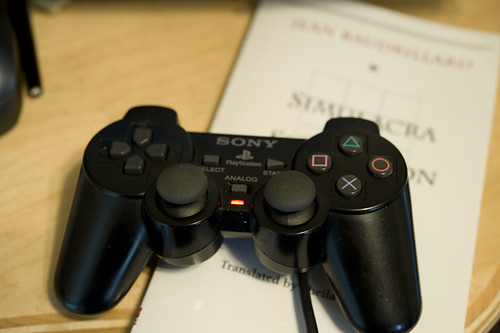
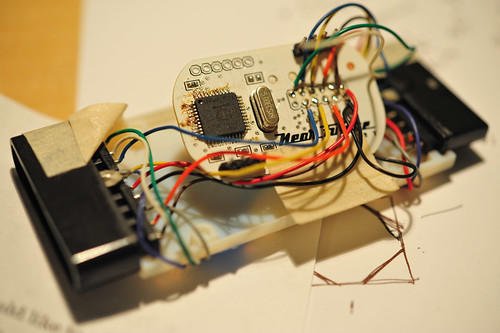
Continuing on my strange pursuit of designing weird interfaces that disrupt conventional game interaction rituals, I put together a bit more of my “PSX” project. You probably don’t recall, but this is the project where I’ve created a little “dongle” that can fool a PS2 (or Playstation 3, as it turns out..) into thinking that the dongle is actually a Playstation controller. You can also hook up a real Playstation controller to it and it can “read” the controller buttons and joystick and pass that data through, or do whatever you want with it. It appears as an TWI/I2C device to anything that talks to TWI/I2C devices..like my favorite TWI/I2C talking thing — the Arduino.
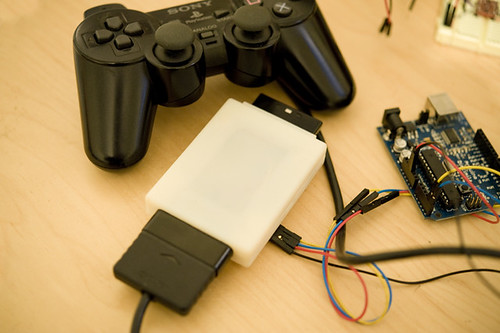
You can see here that the dongle — the white box with those annoying, huge Playstation connectors on either end, one male, one female — has four wires going into it. Those are for power, ground and the TWI signals, SDA and SCL. The power and ground are necessary because the Arduino (at least this one here) and the dongle run at different voltages. The Arduino is a 5V device, while the dongle is a 3.3V device, so there’s some level shifting going on inside there.
So, that’s all fine. It works, etc. But then the question that’s actually more intriguing than building the thing..what do you do with it?
Well, I have some ideas, including hooking up a bike to it and attaching a giant human form kick-boxing dummy to play old school fighting games. For some early fun and nonsense, I connected a Wii Nunchuck up to it to control Playstation games with Wii-y gestures and stuff. Which could be cool if I find the right game, or spend a little more time thinking things through rather than just writing and revising microcontroller firmware to make a TWI controllable device, and doing Catia to CAD-up and print plastic enclosures.
But, in the meantime, I decided to do an absolutely crucial bit of game science. Something that I am entirely sure is mulled over constantly, but never properly investigated. The question is best stated thusly: how long would it take the Little Prince to roll up an entire room based on a random path algorithm?
How long indeed. Well, short answer is a long time. I let it go for about 70 minutes, after which he had just 10 things to go in a particularly tricky location that required rolling across a narrow bridge. At this point, I took over..but check out the 8x speed video anyway!
Katamari Autonomy from Julian Bleecker on Vimeo
I wrote a quick little Arduino code for my PSX dongle to have the Little Prince roll forward and then, after a few moments, make a random directional change. (Or stop, take a load off and look around the world.)
This was all done by sending TWI commands to the appropriate registers in my little DIY Playstation 2 controller emulator. All the buttons and the joysticks can be emulated as to their state through a series of write-to registers. If there’s a controller stuck in the other side of the dongle, there are a complement of read-from registers so you can see if any of the buttons are pressed and how much the joysticks are displaced. (I set up an “escape” buttons sequence — pressing both L2 and R2 — to bring control back to the normal joystick so I could navigate menus or take control over, which I had to do after I realized, with four items left, the completion of cleaning the room would probably not happen before the universe ran out of steam.)
Here’s the Arduino code. Pretty straight forward Wire / TWI library stuff.
#include#include "nunchuck\_funcs.h"
#define is\_bit\_clear(a, n) (0 == (a & (1<<n)))#define is\_bit\_set(a, n)  (1 == (a & (1<<n))
#define is\_button\_pressed(a, button) is\_bit\_clear(a, button)#define is\_button\_released(a, button) is\_bit\_set(a, button)
#define BTN\_SELECT 0#define BTN\_L3 1#define BTN\_R3 2#define BTN\_START 3#define BTN\_UP 4#define BTN\_RIGHT 5#define BTN\_DOWN 6#define BTN\_LEFT 7#define BTN\_L2 8#define BTN\_R2 9#define BTN\_L1 10#define BTN\_R1 11#define BTN\_TRIANGLE 12#define BTN\_CIRCLE 13#define BTN\_X 14#define BTN\_SQUARE 15
// register addresses in the PSX I2C device#define W\_BUTTONS\_0 0x00 // (, ^, start, R3, L3, select#define W\_BUTTONS\_1 0x01 // (square, x, o, triangle, R1, L1, R2, L2)#define W\_RIGHT\_X 0x02#define W\_RIGHT\_Y 0x03#define W\_LEFT\_X 0x04#define W\_LEFT\_Y 0x05
#define R\_BUTTONS\_0 0x12 // (, ^, start, R3, L3, select)#define R\_BUTTONS\_1 0x13 // (square, x, o, triangle, R1, L1, R2, L2)#define R\_RIGHT\_X 0x14 // a value from 0x00 - 0xFF#define R\_RIGHT\_Y 0x15 // a value from 0x00 - 0xFF#define R\_LEFT\_X 0x16#define R\_LEFT\_Y 0x17
// I2C address of the PSX dongleint psx\_dongle\_addr = 0x72;int j;void setup(){  Serial.begin(9600);  randomSeed(analogRead(0));  Wire.begin(); // join i2c bus (address optional for master)

// this is the control register. setting it to 1 means that// we have to tell the PSX device what data to send to the// Playstation2. Setting it to 0 means that it simply passes// through the data from the controller to the PS2. We can// read the state of the contorller at any time.
writeToAddress(psx\_dongle\_addr, 0x24, 1);}
// we'll use count to figure out when to change directionint count = 0;int buttons;
// mode is used to indicate either "pass thru" where we can use the// actually real human controller to control the PS2, or to generate// data via the PSX dongle.// pressing both L2 and R2 simultaneously toggles the modeint mode = 1;byte randomNumber;
void loop(){  byte val;  count++;  //Serial.println(count, DEC); // 0x70 shows up as either ID $20 or ID $E0 on Propeller
/\*\*\*\*\*\*\*\*\*\*\*\*\*\*\*\*\*\*\*\*\*\*\*\*\*\*\*\*\*\*\*\*\*\*\*\*\*\*\*\*\*\*\*//\*  BTN\_SELECT = $0001  BTN\_L3 = $0002  BTN\_R3 = $0004  BTN\_START = $0008  BTN\_UP = $0010  BTN\_RIGHT = $0020  BTN\_DOWN = $0040  BTN\_LEFT = $0080  BTN\_L2 = $0100  BTN\_R2 = $0200  BTN\_L1 = $0400  BTN\_R1 = $0800  BTN\_TRIANGLE = $1000  BTN\_CIRCLE = $2000  BTN\_X = $4000  BTN\_SQUARE = $8000\*\*/

// 0x00 write to BUTTONS\_0, 0x12 read from BUTTONS\_0// 0x01 write to BUTTONS\_1, 0x13 read from BUTTONS\_1// 0x02 write to RIGHT\_X, 0x14 read from RIGHT\_X// 0x03 write to RIGHT\_Y, 0x15 read from RIGHT\_Y// 0x04 write to LEFT\_X, 0x16 read from LEFT\_X// 0x05 write to LEFT\_Y, 0x17 read from LEFT\_Y//Serial.println(getButtons(), HEX);//int buttons = getButtons();//Serial.print(buttons, BIN);//  passThruButtons();
if(count > 512) {  count = 0;}//Serial.println(mode, HEX);
// get the buttonsbuttons = getButtons();
// mode is used to indicate either "pass thru" where we can use the// actually real human controller to control the PS2, or to generate// data via the PSX dongle.// pressing both L2 and R2 simultaneously toggles the mode  if(mode == 1 &&     is\_button\_pressed(buttons, BTN\_L2) && is\_button\_pressed(buttons, BTN\_R2)) {    mode = 0;    delay(1000);  } else  if(mode == 0 &&     is\_button\_pressed(buttons, BTN\_L2) && is\_button\_pressed(buttons, BTN\_R2)) {     mode = 1;     delay(1000);     } if(mode == 1) {passThruAllAndShow(); } if(mode == 0)  {
  writeToAddress(psx\_dongle\_addr, W\_LEFT\_Y, 0x00);  writeToAddress(psx\_dongle\_addr, W\_RIGHT\_Y, 0x00);  passThruButtons();
  if(count == 512) {    count = 0;
    randomNumber = random(1,5);        Serial.print("FLIP! ");        Serial.println(randomNumber, HEX);    switch(randomNumber) {      case 1: case 2: case 6:        writeToAddress(psx\_dongle\_addr, W\_LEFT\_Y, 0x00);        writeToAddress(psx\_dongle\_addr, W\_RIGHT\_Y, 0xAF);        delay(500);        break;      case 3: case 4: case 5:        writeToAddress(psx\_dongle\_addr, W\_LEFT\_Y, 0xAF);        writeToAddress(psx\_dongle\_addr, W\_RIGHT\_Y, 0x00);        delay(500);        break;          default:         delay(500);         break;    }  }
  /\*writeToAddress(psx\_dongle\_addr, W\_LEFT\_X, (float)map(nunchuck\_accelx(), (float)0x48, (float)0xB0,                (float)0x00, (float)0xFF));writeToAddress(pssx\_dongle\_addr, W\_LEFT\_Y, (float)map(nunchuck\_accely(), (float)0x48, (float)0xB0,                (float)0x00, (float)0xFF));
writeToAddress(psx\_dongle\_addr, W\_RIGHT\_Y, (float)map(nunchuck\_joyy(), (float)0x1D, (float)0xDF,                (float)0x00, (float)0xFF));writeToAddress(psx\_dongle\_addr, W\_RIGHT\_X, (float)map(nunchuck\_joyx(), (float)0x1D, (float)0xDF,                (float)0x00, (float)0xFF));\*/}
delay(10);}

//int getButtons(){int result = 0x00;
result = readFromAddress(psx\_dongle\_addr, 0x13, 1);//  Serial.print(result, HEX); Serial.print(" ");result <> 8)); // MSB  Wire.send((int)(addr & 0xFF)); // LSB  Wire.send(data);  Wire.endTransmission();}
byte readFromAddress(int twi\_addr, int addr, int bytes\_to\_read){  byte rdata; Wire.beginTransmission(twi\_addr);  Wire.send((int)(addr >> 8)); // MSB  Wire.send((int)(addr & 0xFF)); // LSB  Wire.endTransmission();  Wire.requestFrom(twi\_addr,bytes\_to\_read);  while (Wire.available()) rdata = Wire.receive();  return rdata;}